matic even GitHub

matic even

We measured a pair of Even Realities G2 glasses. Here is what we found, and the parts to build a G2 app on them: glasses UI, phone UI, test tools, a demo app and a skill for your AI.

Get started with AIGitHub

or get started manually

Measured by Matic, 2026-10-03 to 2026-10-09.

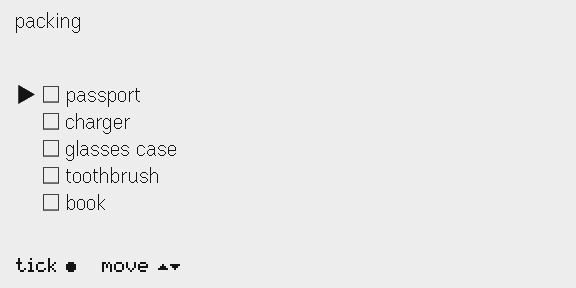
Checklist on the glasses: the title packing, five items with empty tick boxes, a pointer on passport, and the gestures tick and move along the bottom.
checklist, the demo app, on even's simulator

Three packages to build a G2 app from, shown working on this page, and the demo app that puts them together.

1.1Glasses UI

@maticsh/glasses · 17 exports

Drawn by @maticsh/glasses when this page was built, from the code beside each picture. Text in the firmware font is set at that font's measured widths, in your system font.

288 × 20 image, then the font. Drawn at 2×.

Action bar in the pixel font

Use it for a line of gestures and what they do, sent as an image. The pixel font is smaller than the firmware font, and has gesture symbols the firmware font lacks.

import {
  GESTURE_ICON, actionBar, pixelText, pixelTextWidth, type Keymap,
} from '@maticsh/glasses'

const keys: Keymap<() => void> = [
  { gesture: 'tap', label: 'tick', action: () => {} },
  { gesture: 'swipe', label: 'move', action: () => {} },
  { gesture: 'doubleTap', label: 'exit', action: () => {} },
]

// The line comes from the same table the gestures resolve against.
const line = actionBar(keys, {
  widthPx: 288,
  glyphs: GESTURE_ICON,
  measure: s => pixelTextWidth(s),
})

export const bar = pixelText(line, { scale: 2 })

// Every character in the pixel font, at scale 1.
const chars = 'abcdefghijklm nopqrstuvwxyz 0123456789 ●▲▼⬬★▶'
export const font = pixelText(chars, { scale: 1 })

source · site/samples/action-bar.ts
Firmware text. Drawn at 1.5×.

Bars, sparklines and spinners

Use it for progress, a trend or a wait, as plain text from glyphs the firmware font has.

import { bar, sparkline, spinner } from '@maticsh/glasses'

// Plain text in the firmware font: each one is a cheap text write.
export const progress = bar(0.62, 260)
export const draining = bar(1 - 0.25, 260, { fill: '█', empty: '▁' })
export const steps = sparkline([3, 4, 4, 6, 9, 7, 5, 6, 8, 12, 10, 11])
export const frames = [0, 1, 2, 3].map(spinner)

source · site/samples/glyphs.ts

fitLines · 2 linesPickuptheparcelfromthefrontdeskbeforesix,thencallthe…truncatePickuptheparcelfromthefron...spread9:41bat84%
Firmware text in 288 px. Drawn at 1.5×.

Text that fits

Use it for text that has to fit a box. The firmware wraps by pixels, scrolls what overflows, and has no alignment.

import { fitLines, spread, truncate } from '@maticsh/glasses'

const note = 'Pick up the parcel from the front desk before six, '
  + 'then call the garage about the brakes.'

// Cut at a word to fit two lines in 288 px, with an ellipsis.
export const fitted = fitLines(note, 288, 2)

// One line, cut by pixels.
export const line = truncate(note, 288)

// Left and right on one line, padded with spaces by pixels.
export const status = spread('9:41', 'bat 84%', 288)

source · site/samples/fit.ts

tue·oct20Parcelatthefrontdeskuntilsix.Callthegarageaboutthebrakesbeforenoontomorrow.next10:15stand-up,room4
buildPage output at 576 × 288, each container outlined.
idnamekindx, ysizecapture
1clockimage16, 16240 × 60
2daytext360, 16200 × 32
3notetext16, 96544 × 60yes
4nexttext16, 170300 × 72
5barimage16, 256288 × 20

A page from a spec

Use it for a page as data. It assigns IDs, checks the limits, keeps exactly one capture container and re-attaches the menu on every rebuild.

import {
  GESTURE_ICON, actionBar, buildPage, corner, fitLines,
  pixelText, pixelTextWidth, pixels,
} from '@maticsh/glasses'

const note = 'Parcel at the front desk until six. '
  + 'Call the garage about the brakes before noon tomorrow.'

export const page = buildPage({
  containers: [
    { kind: 'image', name: 'clock',
      box: { x: 16, y: 16, width: 240, height: 60 } },
    { kind: 'text', name: 'day',
      box: corner(200, 32, 'tr', 16), content: 'tue · oct 20' },
    { kind: 'text', name: 'note', capture: true,
      box: { x: 16, y: 96, width: 544, height: 60 },
      content: fitLines(note, 544, 2) },
    { kind: 'text', name: 'next',
      box: { x: 16, y: 170, width: 300, height: 72 },
      border: { width: 1, color: 15, radius: 6 }, padding: 6,
      content: 'next 10:15\nstand-up, room 4' },
    { kind: 'image', name: 'bar',
      box: { x: 16, y: 256, width: 288, height: 20 } },
  ],
})

// Grids for the two image containers. The app encodes them to PNG
// in the browser and sends them once the page is up.
const line = actionBar([
  { gesture: 'tap', label: 'done', action: null },
  { gesture: 'swipe', label: 'scroll', action: null },
], {
  widthPx: 288,
  glyphs: GESTURE_ICON,
  measure: s => pixelTextWidth(s),
})

export const images = {
  clock: pixels.dotText('09:41', { dot: 6, gap: 2 }),
  bar: pixelText(line, { scale: 2 }),
}

source · site/samples/page.ts

1.2Phone UI

@maticsh/phone · 11 exports

Parts from @maticsh/phone, running on this page with the package's own code and stylesheet. Tap them. The rows, the toggle and the segmented control drive the preview and the strip.

Preview

Use it for what the glasses show, drawn at their 576 × 288 shape on the phone page.

glassSvg(screen)

Strip

Use it for the preview in one line: the title, the row the glasses point at, and a count.

stripHtml(screen, meta)

Check rows

Use it for an item with a tick box, its name and an Edit button. Tap a name to move the pointer.

checkRow({ text, ticked, pointer, tick, pick, edit })

Segmented control

Use it for a choice between two to four things.

segmented(segments)

Toggle row

Use it for an on or off setting, with a plain label.

toggleRow({ title, sub, on, act })

Tab bar

Use it for moving between the sections of a phone page.

tabBar(tabs, current, act)

Button row

Use it for one action on one thing, with an optional way in.

buttonRow({ title, sub, button, open })

Value row

Use it for a row that opens something deeper.

valueRow({ title, value, act })

Slider

Use it for a number or a time picked from a range, its value in monospace.

slider({ label, value, min, max, step, format, change })

Buttons

Use it for ink, ghost and disabled pills, and a full-width button inside a card.

button({ label, variant }) wide({ label })

"Sure?"

Use it for a remove that needs a second tap within 3 s. Browser dialogs inside the Even app are untested.

createConfirm()

Empty state static

Use it for a card with nothing in it yet: what is missing, and where to add it.

empty(title, body)

Note static

Use it for one or two plain lines under a card: a limit, a fact, the privacy line.

note(text)

1.3Test tools

@maticsh/testing · 4 exports

Test tools for Even Realities G2 apps. They catch on your machine what would otherwise fail silently on the glasses, or at store review.

FakeBridge

Use it for unit tests with no glasses. It records every call, and checks each payload the way the SDK and firmware would.

import { buildPage } from '@maticsh/glasses'
import { FakeBridge } from '@maticsh/testing'

const bridge = new FakeBridge()
const page = buildPage({
  containers: [{
    kind: 'text', name: 'count', content: '0', capture: true,
    box: { x: 0, y: 0, width: 576, height: 288 },
  }],
})

await bridge.imuControl(true, 100) // before the page exists
await bridge.createStartUpPageContainer(page.create)
await bridge.createStartUpPageContainer(page.create) // a second one

// The glasses drop both with no error. The fake records them,
// so the test fails.
try {
  bridge.assertNoViolations()
} catch (e) {
  console.log((e as Error).message)
}

source · site/samples/fake-bridge.ts

output

bridge violations:
- imuControl before createStartUpPageContainer
- createStartUpPageContainer called twice; use rebuildPageContainer

Manifest lint

Use it for checking app.json against the packaging and review rules, in your tests.

import { lintManifest } from '@maticsh/testing'

const issues = lintManifest({
  package_id: 'com.example.Notes',
  edition: '202601',
  name: 'Even Notes',
  version: 'v1.0',
  entrypoint: 'index.html',
  min_sdk_version: '0.0.16',
  permissions: [{
    name: 'network', desc: 'Syncs your notes.',
    whitelist: ['https://api.example.com/v1'],
  }],
  supported_languages: ['en'],
})

for (const i of issues) {
  console.log(`${i.level}  ${i.field}: ${i.message}`)
}

source · site/samples/manifest.ts

output

error  package_id: lowercase reverse-DNS, 2+ segments, letters and digits, each segment starts with a letter
error  name: a name containing "Even" (any case) is rejected at review
error  version: must be x.y.z with no prefix or suffix
error  permissions[0].whitelist: "https://api.example.com/v1" must be a bare https:// or wss:// origin with no path or wildcard

URL scan

Use it for checking a built bundle the way store review does: every URL string must be on the network whitelist. npx maticsh-urls in an app's folder runs it on a build.

import { scanUrls } from '@maticsh/testing'

const bundle = [
  'const FEEDS = ["https://example.org/feed.xml"]',
  'const url = `https://${host}/rss`',
  'fetch("https://api.example.com/items")',
].join('\n')

const findings = scanUrls({
  manifest: { permissions: [{
    name: 'network', desc: 'Reads feeds.',
    whitelist: ['https://api.example.com'],
  }] },
  files: [{ path: 'assets/index.js', text: bundle }],
})

for (const f of findings) {
  const at = f.path ? ` (${f.path}:${f.line})` : ''
  console.log(`${f.severity}  ${f.rule}: ${f.detail}${at}`)
}

source · site/samples/urls.ts

output

error  url-not-whitelisted: https://example.org/feed.xml (assets/index.js:1)
error  url-not-whitelisted: https://${host}/rss (assets/index.js:2)

1.4The demo app

apps/checklist

A demo G2 app: three short lists, ticked from the glasses and edited on the phone. It is built on @maticsh/glasses and @maticsh/phone, and tested with @maticsh/testing. It is also the template for a new app.

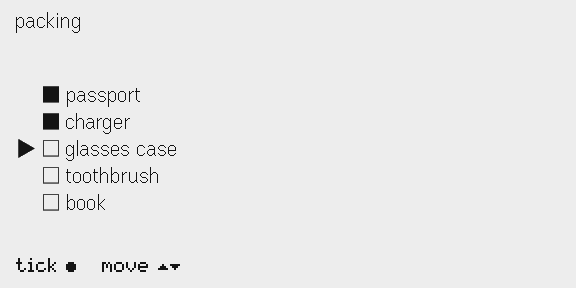
Checklist on the glasses after two ticks: passport and charger ticked, the pointer on glasses case.
the glasses, on even's simulator, after tap · swipe · tap · swipe
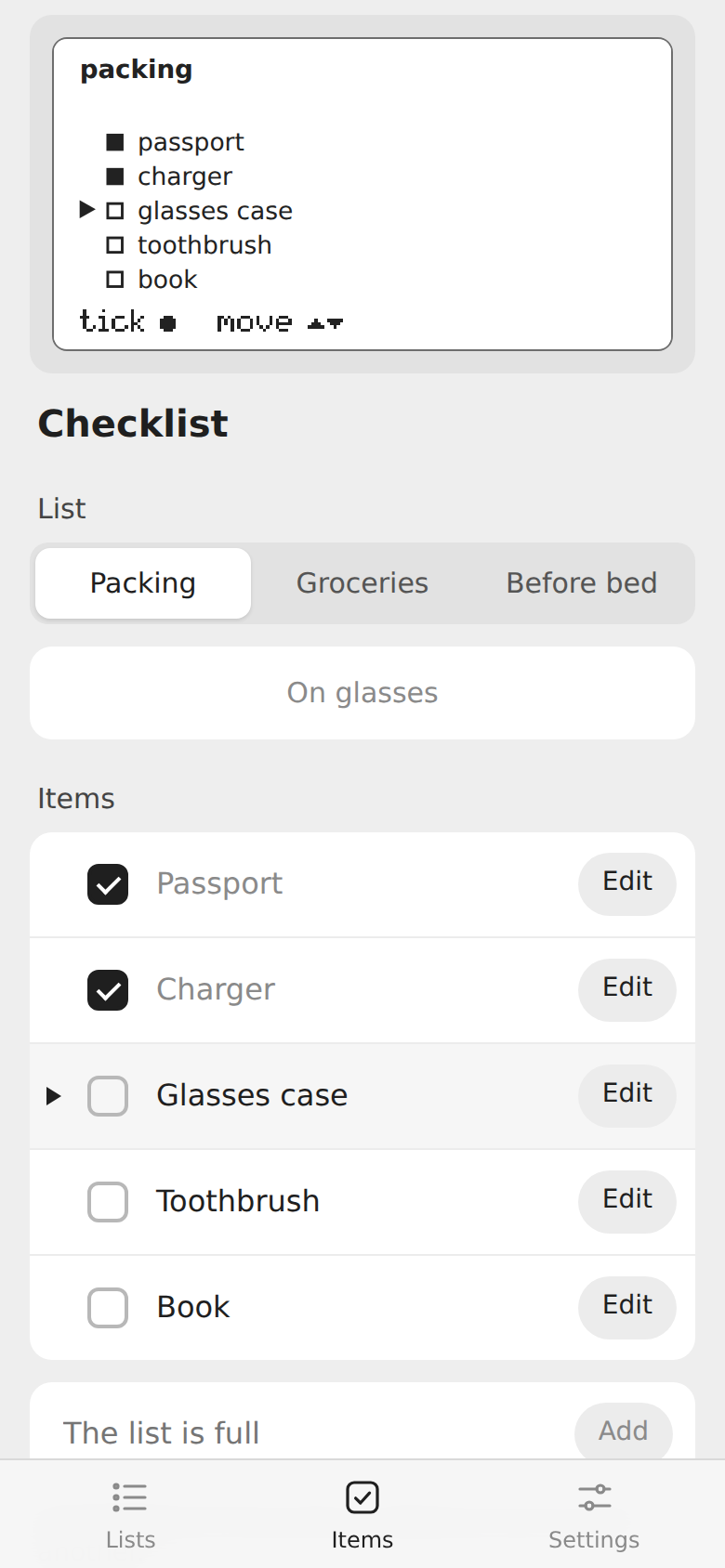
Checklist's phone page on the Items tab: the glasses preview, the list picker, and five items with tick boxes and Edit buttons.
its phone page, at 390 wide

What it shows

PartWhere
Gestures to actions, and the bar, from one tablesrc/app/glasses.ts, src/app/screen.ts
A page with text fitted by pixels and the bar as a pixel-font imagesrc/app/layout.ts
One screen model that the glasses and the phone preview both drawsrc/app/screen.ts
State as pure functions, saved through a typed storesrc/domain/lists.ts
Foreground events as checkpoints, and saving on exitsrc/app/glasses.ts
A phone page built only from @maticsh/phonesrc/infra/phone.ts
A dev preview on FakeBridge, with the remote and the Kit viewphone-preview.html, src/phone-preview.ts
Tests on FakeBridge, and a manifest linttests/

Use it as a template

The @maticsh/* packages are on npm at 0.1.0, and this folder declares every package it needs, so a copy runs on its own. Node 24 or later:

npx degit maticsh/matic-even/apps/checklist my-app && cd my-app && npm install

Then:

  1. Set your own package_id and name in app.json, your own name in package.json, and your own .ehpk name in the pack script.
  2. Run npm test, then npm run dev and npm run qr.
  3. Before you submit, run npm run build, then npm run urls: the URL scan that store review runs (no URL strings off the whitelist). Then npm run pack.

To build an app inside this repo instead, copy the folder to apps/<your-app>. npm links the packages from the workspace, and the app loads their TypeScript source, so a change to a package shows without a build.

How we measure the G2 with our probe app, and what store review taught us.

2.1The probe app

apps/probe · v0.1.4

A G2 plugin that measures the glasses. Every finding in this repo came from it, or from an app built the same way.

Put one thing on the glasses. Measure it, or log it. Write down what you saw, with the setup and the date. Then turn it into a claim that someone else can check.

npm ci                 # at the repo root
cd apps/probe
npm run dev            # the dev server, on port 5199
npm run qr             # in a second terminal: scan it in the Even app

The first time, turn on developer mode in the Even app: run it on your glasses.

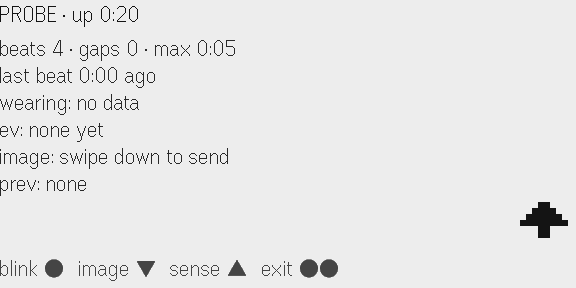
The probe's main page on the glasses: uptime, a heartbeat count with gaps, the wearing sensor, the last events and image, and a gesture bar.
the probe's main page, on even's simulator
Requirements
  • Node 24 or later.
  • Even Realities G2 glasses, paired with the Even app on your phone.
  • Developer mode in the Even app (see below).
  • A phone that can reach your computer: the same Wi-Fi, or a VPN.
Install and check

The probe is one app in this repo's npm workspace. It builds on @maticsh/glasses and tests with @maticsh/testing (both in packages/). Install once, from the repo root:

npm ci
cd apps/probe
npm run typecheck
npm test

Run the scripts below from apps/probe.

Scripts
ScriptWhat it does
npm run devStarts the dev server on port 5199. It also collects the probe's log into logs/
npm run qrPrints a QR code for the dev server, to sideload onto your glasses
npm run simOpens the probe in Even's simulator (needs npm run dev running)
npm testRuns the unit tests on a fake bridge
npm run typecheckChecks types
npm run buildTypechecks, then builds into dist/
npm run packBuilds, then packs probe.ehpk for a private or beta install

On a Linux machine with no display, run the simulator under xvfb-run -a.

Run it on your glasses
One-time setup
  1. Pair your glasses in the Even app, and take any firmware update first.
  2. Turn on developer mode. It has no switch. Sign in at https://hub.evenrealities.com with the same account as the phone app. Then force-quit the Even app and open it again. A Scan QR button now shows in the Even Hub tab.
Each session
  1. Run npm run dev.
  2. In a second terminal, run npm run qr.
  3. In the Even app, open the Even Hub tab, tap Scan QR, and scan the code. The probe opens on the glasses.
  4. Keep the phone unlocked and the Even app in front, unless the test says otherwise.
  5. The phone page mirrors the glasses and shows extra detail. console output shows in the Even app's developer console.
Which address the QR code uses

The phone loads the probe from your computer, so the QR code and the hot-reload socket need an address the phone can reach.

  • By default, the probe uses your computer's LAN address (a private IPv4 address such as 192.168.x.x).

  • If the phone reaches your computer at another address (a VPN, or a second network card), set DEV_HOST:

    DEV_HOST=10.0.0.12 npm run dev
    DEV_HOST=10.0.0.12 npm run qr
  • Set DEV_PORT to use a port other than 5199. Set it for both commands.

devHost in @maticsh/testing/dev picks the address. Every app in this repo uses it.

To check the address, open http://<address>:5199 in the phone's browser. The probe's phone page should load.

The pages

The probe has four pages. Each one measures a few things. The bottom line on the glasses lists the gestures for the page.

Main page
GestureWhat it doesWhat it measures
TapRuns the next blink style: hard, blank, edgeWhich alert catches the eye (H1)
Swipe downSends a 144 x 144 test image and times itImage speed, greys, flicker (H3, H4, H5)
Swipe upOpens the Sense page
Double tapOpens the OS exit dialog

The six lines of the main page:

  1. beats 12 · gaps 0 · max 0:05: a heartbeat every 5 s. A gap is an interval over 15 s, which means the app was suspended (H10, H15).
  2. last beat 0:02 ago.
  3. wearing: yes since 14:05:09 · bat 80%: the wearing sensor and the battery (H6, H17).
  4. ev: in 12s · out 8s: the last three raw foreground events. The phone page lists all of them with clock times (H7).
  5. image: 240 ms (#3): the last image send.
  6. prev: up 18:02, died ~14:23:10: how long the last run lived. The probe stores its stats, so this survives a relaunch.
Sense page

Swipe up from the main page. The IMU turns on at pace 100. The corner sprite changes frame every 5 s.

GestureWhat it does
TapIMU on or off
Swipe downNext pace: 100, 200, 500, 1000 ms
Swipe upBack to the main page. The IMU turns off
Long pressCounts and times the press, and marks the log

The page shows live x, y and z, the measured sample rate, a still or moving guess, the long-press count and time, the battery change since the page opened, and the sprite frame count. It measures the IMU (H13, H14), long press (H16) and battery cost (P10).

Text levels page

Tap, then hold, to open the OS menu. Pick Text levels. The page shows one row at each textColor level, 0 to 4 (H2). Swipe up to go back.

Scripts page

Pick Scripts from the OS menu. The left half shows six rows of Latin, Chinese and Hindi in the firmware font. The right half shows the same text drawn by the phone, as images at several sizes. The phone page shows the reference text to compare against (H23). Swipe up to go back.

The OS menu also has Reset stats, Blink, Send image and Sense.

The log

While npm run dev runs, the probe posts its log to the dev server every 5 s. Each launch writes one file: logs/sense-<date>-<time>.csv. The dev server takes posts only from this machine and from private networks. Nothing like this ships in probe.ehpk.

ColumnMeaning
t_msTime on the phone, in ms since 1970
kindimu, hold, release, pace, imuOff, battery, frame, frameFail or wearing
x, y, zIMU sample, in g
valueThe pace, the press length in ms, the battery level, the frame state or the wearing state
Mark the log with a long press

A long press on the Sense page writes a hold row, then a release row with the press length. Use it as a marker. Press once at the start of each step of a script, so you can line the data up with what you did.

Long press is fine for a test tool like this. Do not build app features on it: users can bind it to a system action (H19).

The IMU script

This is the run behind H13 and H14. Open the Sense page. Long-press once at the start of each step.

  1. Sit and type, 2 min. Work as normal.
  2. Look up and around, 1 min. Look at the ceiling, the window, across the room.
  3. Look down at your phone, 1 min.
  4. Stand up and sit down three times, 1 min.
  5. Walk, 2 min.
  6. Sit still again, 1 min.
  7. Paces. Swipe down to step through 200, 500 and 1000. Hold each one for 30 s while you sit still.
  8. Glasses off for 10 s, then back on.

Then leave the page running for 30 min or more (P10, P12).

Turn a run into a finding
  1. Ask one narrow question, such as "How fast does a 144 x 144 image land?"
  2. Run it more than once. Note how many times, and say so in the finding.
  3. Write the claim first. One or two sentences, with numbers and units.
  4. Write the method. Which page, which gestures, what you watched or logged. Someone else must be able to repeat it.
  5. Write the setup. Glasses and firmware, Even app version, SDK version, phone and OS, install type (QR sideload, private build or beta build), phone locked or unlocked.
  6. Write the date you measured it.
  7. Write what it means for an app. One or two rules a developer can follow.
  8. Attach the raw log if you have one. Trim it to the part that matters.
  9. Open an issue or a pull request in the format in contributing.

Say what you do not know. "Not timed" and "seen once" are useful facts.

Change the probe
  • Add a page for your question. Keep each page to six lines of text, so it never scrolls.
  • Put the maths in pure functions, and test them (tests/probe.test.ts).
  • Run every change on the fake bridge first. FakeBridge checks each payload the way the SDK and firmware would, and assertNoViolations() fails the test on any silent error.
  • Turn every sensor off on the exit events (switch sensors off at exit).
The packages

The probe uses the same packages as any app in this repo. They are MIT licensed, like the rest of the repo.

PackageWhat the probe uses from it
@maticsh/glassestoIntent, buildPage, strip, actionBar, resolve, missingGlyphs, the renderer, the store and the lifecycle
@maticsh/testingFakeBridge and lintManifest, in tests/probe.test.ts

2.2Findings

H1 to H23 · 7 topics

Each finding states a measured claim and what it means for your app. The IDs are stable, so you can cite them: #h12.

display 5 · images and bandwidth 3 · sensors 4 · lifecycle and the phone 3 · fonts and scripts 3 · input 4 · the webview 1

Who measured it, and on what
  • Glasses: one pair of Even G2. We did not record the firmware version.
  • SDK: @evenrealities/even_hub_sdk 0.0.16.
  • Phone: an iPhone with the Even app. We did not record the iOS and Even app versions.
  • Install: QR sideload from a dev server, unless a finding says otherwise.
  • Tool: the probe app in the probe app, versions 0.1.1 to 0.1.4.
  • Dates: 2026-10-03 to 2026-10-09.

One person made every observation. Some findings come from a single run. Each finding says how often we saw it.

Display 5

Where the display sits, how bright text behaves, how to alert, and how pages change.

Images are in images and bandwidth. Fonts and scripts are in fonts and scripts.

H1Blink a small, solid shape to alert

Claim. A dense, solid cluster of lit pixels catches the eye. A small filled sprite at the screen edge works best. Thin text strokes that blink read as flicker. Density matters more than the total count of lit pixels.

Styles compared:

StyleWhat changesFrameResult
hardHeader textColor 4 to 0 and back400 msWorks
blankHeader text on and off400 msWorks
softHeader textColor 4 to 1 and back400 msFails. It reads like ordinary flicker from the room
BarA full-width █ barNot recordedReads as aggressive
edgeA 48 x 48 tree sprite in the corner, on and off500 msWorks. It is the low-ink middle ground between text and a full bar. The tester liked it best

Method. Probe main page. Each tap runs the next blink style. The tester judged whether each style catches the eye of someone deep in other work. The edge sprite uses 500 ms frames because an image takes about 250 ms to land (H4).

Setup. Even G2, SDK 0.0.16, probe 0.1.1 and 0.1.2, QR sideload, iPhone. Firmware not recorded.

Date. 2026-10-03.

Confidence. Compared once, by one person.

For your app.

  • Alert with a small, dense, filled shape at the screen edge.
  • As a backup, blink text with hard or blank.
  • Do not use soft. People read it as noise.

Trap found with this probe. After a hard blink, the header stayed dim. The probe's renderer merged two queued updates to the header: "restore at level 4", then a later update with no colour. The merge lost the colour. If you batch text updates per container, keep a queued colour when a later update sets none. The renderer in packages/glasses/src/infra/renderer.ts does this. The probe test "runs every blink style without leaving the screen changed" checks it.

H2Text brightness levels look too alike to rank text

Claim. All five textColor levels (0 to 4) render, and level 0 is visible. In normal use the levels look close together. They do not give a useful hierarchy.

Method. Probe Text levels page (tap, then hold, then pick Text levels). It shows one row at each level.

Setup. Even G2, SDK 0.0.16, probe 0.1.1, QR sideload, iPhone. Firmware not recorded.

Date. 2026-10-03.

Confidence. One session on the levels page.

For your app.

  • Leave text at the default level. Users set overall brightness in the OS.
  • Keep textColor changes for alerts (H1).
  • Rank text by position, spacing, borders and glyph weight.
  • When you need real shades, draw them in an image (H3).
H18The display sits above the line of sight

Claim. The display sits in the upper part of the view, above the line of sight. You refocus your eyes to read it. The hands-free wake is a head tilt up of about 30°. The display never covers what you look at. When you look up at it, your eye lands in its middle.

Method. Observation from daily wear. No instrument.

Setup. Even G2. Firmware not recorded.

Date. 2026-10-04.

Confidence. One wearer's report.

For your app.

  • Put the thing people look up for in the centre of the display.
  • If your app reads head pitch from the IMU (H13), expect a tilt up each time the wearer reads the display. A rule such as "head up by 10° or more" fires on every glance at the display.
H20A page rebuild cannot animate

Claim. rebuildPageContainer swaps the layout at once. A box that should "grow" into a new layout shows a flicker, then the new layout.

Two more traps showed up in the same work:

  • A page rebuilt with empty text, then filled in with an upgrade, shows the fill as a second jump.
  • The page builder in Matic's kit refused a page before sending it, because its text held characters that the firmware font lacks. The text was a news story. It held invisible zero-width spaces and word joiners (U+200B, U+2060). The page builder checks every glyph against Even's pretext font data. We did not test what the firmware does with such a page on create.

Method. Seen on glass while building a reader app. Its reader view opens with a page rebuild. Not timed.

Setup. Even G2, SDK 0.0.16, QR sideload, iPhone. Firmware not recorded.

Date. 2026-10-05.

Confidence. Seen on glass in one app.

For your app.

  • Do not plan transitions between layouts. Each rebuild is a cut.
  • Build the new page with its text already in it.
  • Strip characters the font lacks before you build a page. missingGlyphs in packages/glasses/src/domain/budget.ts finds them with @evenrealities/pretext.
H21Overflowing text scrolls in firmware

Claim. A full-screen text container that captures input and holds more text than fits scrolls on swipe. The firmware does the scrolling. Taps still reach the app.

Unknown. Whether the firmware sends an event when the scroll reaches the end. Nobody has seen one yet.

Method. Seen on glass in the same reader app's reader view.

Setup. Even G2, SDK 0.0.16, QR sideload, iPhone. Firmware not recorded.

Date. 2026-10-05.

Confidence. Seen on glass in one app.

For your app.

  • For long text, one capturing text container gives you scrolling with no code.
  • Do not depend on an end-of-scroll event until someone records one. If you see one, report it.

Images and bandwidth 3

How fast images reach the glasses, and what they can show.

H3Images show all 16 grey levels

Claim. All 16 grey steps in a PNG image are distinguishable on glass.

Method. The probe's test image (144 x 144) has a row of 16 grey steps along the bottom. Swipe down on the probe main page to send it.

Setup. Even G2, SDK 0.0.16, probe 0.1.1, QR sideload, iPhone. Firmware not recorded.

Date. 2026-10-03.

Confidence. Seen once.

For your app. For real shades, or for text smaller than the firmware font, draw an image. Text has five levels that look alike (H2).

H4A small image lands in 150 to 300 ms

Claim. A 144 x 144 PNG sent with updateImageRawData lands in 150 to 300 ms, mostly 200 to 300 ms. Even's guidance says to expect 0.5 to 2 s per frame.

Method. Swipe down on the probe main page. The probe times each send from the start (this includes drawing the PNG on the phone) until the SDK call resolves. The time shows on the glasses and the phone. Repeated swipes.

Setup. Even G2, SDK 0.0.16, probe 0.1.1, QR sideload, iPhone, phone unlocked. Firmware not recorded.

Date. 2026-10-03.

Confidence. Repeated swipes in one session. Larger images were not timed.

For your app. At about 250 ms a frame, a slow animation works: a stage change, or a short effect of a few frames. Full-screen video does not.

H5Image replacement does not flicker, and rapid sends all land

Claim. Replacing an image does not flicker. Updates feel nothing like e-ink. Rapid repeated sends all land.

Method. Rapid sends from the probe main page. Each send is numbered, and each test image carries a tick that moves one cell per send, so every frame that lands shows as a change. The probe sends images one at a time through a write queue. We did not test parallel sends.

Setup. Even G2, SDK 0.0.16, probe 0.1.1, QR sideload, iPhone. Firmware not recorded.

Date. 2026-10-03.

Confidence. Repeated.

For your app.

  • Send images one at a time. Queue them, and keep one send in flight. packages/glasses/src/infra/write-queue.ts is a small queue that does this.
  • Replace an image freely. Nothing flashes between frames.

Open: do image sends wipe upgraded text?

In simulator 0.9.5, text that was upgraded earlier vanishes about a second after the next few image sends. It comes back only when it is sent again. Nobody has checked this on glass. See probe P13.

Sensors 4

The wearing sensor and the IMU.

Store review rejects an app that leaves a sensor on at exit. See switch sensors off at exit.

H6The wearing sensor reports while a plugin is open

Claim. onDeviceStatusChanged reports isWearing going off and on while a plugin is open. We did not time the latency (probe P4).

Method. Probe main page. Take the glasses off for 10 s, then put them back on. The page shows the wearing state and the time it changed.

Setup. Even G2, SDK 0.0.16, probe 0.1.x, QR sideload, iPhone. Firmware not recorded.

Date. 2026-10-03.

Confidence. Seen once.

For your app. The sensor works, but only when the user has wear detection on. Read H17 first.

H17Wear detection is a user setting

Claim. Wear detection is a setting the user controls. With it off, isWearing reports false from the start and never changes.

Method. Probe main page, with wear detection off in the tester's settings.

Setup. Even G2, SDK 0.0.16, probe 0.1.x, QR sideload, iPhone. Firmware not recorded.

Date. 2026-10-03.

Confidence. Seen on one pair of glasses.

For your app.

  • Never depend on the wearing sensor.
  • Use the IMU as a fallback. Glasses on a desk read dead still, at a new resting tilt (H14).
H13The IMU is an accelerometer in g

Claim.

  • imuControl(true, pace) works on the G2. The simulator refuses it.
  • x, y and z are an accelerometer in g. The length of the vector is 1.0 at rest.
  • x is head pitch. Positive x means the wearer looks up. Negative x means the wearer looks down.
  • Pace is the gap between samples in ms, exactly: 100 gives 10 Hz, 200 gives 5 Hz, 500 gives 2 Hz, 1000 gives 1 Hz.

Method. Probe Sense page. Swipe up from the main page to turn the IMU on at pace 100. Swipe down to step through the paces. The page shows live x, y, z and the measured sample rate. Every sample streams to a CSV log on the dev server. One run of 18 min.

Setup. Even G2, SDK 0.0.16, probe 0.1.3, QR sideload, iPhone. Firmware not recorded.

Date. 2026-10-03.

Confidence. One 18-minute run.

For your app.

  • Test IMU code on glass. The simulator will not run it.
  • Turn the IMU on only after your first page is mounted. The SDK refuses it before a page exists.
  • The bridge drops zero values on the wire, so a missing axis means 0.
  • Turn the IMU off on the exit events (switch sensors off at exit).
H14The IMU can tell what the wearer is doing, even at 1 Hz

Claim. Simple statistics on the accelerometer separate common activities. The measure below is the sum of the standard deviations of x, y and z over a 10 s window.

ActivityMotion (sum of SDs, 10 s window)
Sitting still0.01 to 0.06
Typing0.03 to 0.10
Standing up, sitting down, walking0.3 to 0.9
Head positionPitch
Looking up+16° to +30°
Looking down at a phone−23° to −43°
  • Glasses off on a desk read dead still, at a new resting tilt.
  • At 1 Hz, the log was enough to find a short seated break away from the desk, to the second. Its pattern: a large jolt, 40 s still with the head down, a heave, then a walk. We found the pattern by reading the CSV afterward.
  • One IMU dropout of 29 s happened while the app kept running. The cause is unknown (probe P12).

Method. Probe Sense page, following the IMU script in the probe app. A long press marks the log at the start of each step. We analysed the CSV log afterward. Pitch angles come from the accelerometer vector.

Setup. Even G2, SDK 0.0.16, probe 0.1.3, QR sideload, iPhone. Firmware not recorded.

Date. 2026-10-03.

Confidence. One run, one wearer.

For your app.

  • Pace 1000 (1 Hz) is enough to tell looking up, looking down, sitting still and moving apart.
  • At slow paces, judge stillness over a window of about 10 s. At 1 Hz, a 1 s window holds one sample.
  • The probe's STILL_BELOW threshold of 0.05 sits at the top of the still range.

Lifecycle and the phone 3

Foreground events, OS overlays, and how long a plugin keeps running.

Open questions here: P3 (a 30-minute lock) and P8 (what fires when the phone backgrounds the Even app).

H7OS overlays fire foreground events: ENTER on open, EXIT on close

Claim.

  • The OS has two overlays that sit over a plugin:
    • The contextual menu. The user taps, then holds.
    • The exit dialog. The user double taps, and the app calls shutDownPageContainer(1).
  • Both overlays fire foreground events. The page stays mounted under both.
  • Opening an overlay fires FOREGROUND_ENTER_EVENT. Closing it fires FOREGROUND_EXIT_EVENT. This matches Even's docs.

Method. Probe main page, probe 0.1.2. The probe logs every raw foreground event, with its time, before any lifecycle code sees it. The phone page shows the full list. Open and close each overlay, then read the order.

The first version of the probe counted events after its lifecycle module. That module ignored an ENTER while the app was already active, so the counters hid the real order. Log raw events before any filter.

Setup. Even G2, SDK 0.0.16, probe 0.1.2, QR sideload, iPhone. Firmware not recorded.

Date. 2026-10-03.

Confidence. Confirmed with the raw event log.

For your app.

  • Treat every foreground event, in either direction, as a checkpoint. Save state, then re-arm sockets, audio and location. Make that work cheap and safe to repeat.
  • Never map EXIT to pause and ENTER to resume. With overlays, that mapping pauses your app when the menu closes, just as the user comes back to it. Matic's kit had this bug until this probe found it.
  • Clean up on the exit events (SYSTEM_EXIT_EVENT, ABNORMAL_EXIT_EVENT). Do not clean up when you open the exit dialog, because the user can cancel it (switch sensors off at exit).
  • The contextual menu is a fifth input for rare actions. Your page sets its items. The probe uses it for its extra pages. An action bar can point at it with ● ●━.
  • packages/glasses/src/infra/lifecycle.ts is one small module that handles the checkpoints and the exit events.
H10A sideload runs without gaps with the phone unlocked

Claim. Over one sideload session with the phone unlocked, the probe's 5 s heartbeat had 0 gaps. The longest interval between beats was 8 s.

Method. Probe main page. A timer beats every 5 s. A gap is any interval over 15 s, which means the WebView or its timers were suspended. The probe stores its stats, so a relaunch shows how long the last run lived.

Setup. Even G2, SDK 0.0.16, probe 0.1.x, QR sideload, iPhone, phone unlocked. Firmware not recorded.

Date. 2026-10-03.

Confidence. One session. Its length was not recorded.

For your app. With the phone unlocked, timers keep running. Expect some jitter: one interval of 5 s stretched to 8 s.

H15A QR sideload kept running for 18 minutes with the iPhone locked

Claim. A QR sideload ran for 18 min with the phone locked. In that time:

  • A sprite frame went out every 5 s: 184 frames, 0 failed.
  • IMU samples kept arriving.
  • The probe kept posting its log to the dev server over the network.

Even's docs say a QR sideload dies when the phone locks. This run contradicts that on an iPhone. It is a partial answer to P3.

Method. Probe Sense page, phone locked, CSV log streaming to the dev server.

Setup. Even G2, SDK 0.0.16, probe 0.1.3, QR sideload, iPhone, phone locked. Firmware and iOS version not recorded.

Date. 2026-10-03.

Confidence. One run, one iPhone. Android was not tested.

For your app.

  • A lock of 18 min did not stop a sideload on an iPhone. Longer locks are untested, so save state on every checkpoint.
  • Store review locks the phone for 5 min. Test the lock with the build you ship.

Fonts and scripts 3

The G2 has one firmware font. The SDK has no size control. These findings cover how it looks and which scripts it can show.

H8The simulator makes glyphs look heavier than they are

Claim. On glass, ●, ▲ and ▼ look balanced next to the font's letters. The simulator makes them look heavier.

Method. Observation on glass and in the simulator. The probe's action bar uses these glyphs (blink ● image ▼ sense ▲ exit ●●).

Setup. Even G2, SDK 0.0.16, probe 0.1.x, QR sideload, iPhone. Simulator version not recorded. Firmware not recorded.

Date. 2026-10-03.

Confidence. Seen once.

For your app. Judge glyph weight on glass. Do not thin out symbols because they look heavy in the simulator.

H9The firmware font reads a little large

Claim. The firmware font reads a little large on glass. The SDK has no font size control.

Method. Observation on glass.

Setup. Even G2, SDK 0.0.16, QR sideload, iPhone. Firmware not recorded.

Date. 2026-10-03.

Confidence. One person's opinion.

For your app. Plan your text for the size it is. For smaller text, draw it on the phone and send it as an image (H3, H23).

H23The firmware font has no Hindi. Send it as an image

Claim.

  • The firmware font has no Devanagari. The glasses accept a text upgrade that holds Hindi. The Latin in it shows. Every Devanagari character drops, with no error. The simulator does the same.
  • Even's @evenrealities/pretext package agrees. Its font chain is Latin, then Cyrillic and Greek, then CJK. It has no Devanagari, Bengali, Tamil, Arabic, Hebrew or Thai.
  • Chinese text renders in the firmware font.
  • Hindi drawn on the phone and sent as an image renders well.

Image sizes, judged on glass:

ScriptSizeResult
Chinese12 pxLegible, but dense characters (量, 讓) merge
Chinese16 px, 20 pxRead well. The tester preferred these
Hindi14 pxLegible
Hindi18 pxReads best. It matches the size of the firmware's English text

Method. Probe Scripts page (tap, then hold, then pick Scripts). The left half has six rows in the firmware font. Each row starts with a Latin letter, so a row whose script is missing still shows its letter. The rows mount with only the letter, then the full text goes out as a text upgrade. The right half holds the same text drawn by the phone's own font engine, as images at several sizes. The phone page shows the reference text to compare against.

Setup. Even G2, SDK 0.0.16, probe 0.1.4, QR sideload, iPhone. Firmware not recorded.

Date. 2026-10-09.

Confidence. One session on glass.

For your app.

  • Check every string with pretext before you send it. missingGlyphs in packages/glasses/src/domain/budget.ts does this.
  • For Hindi and the other missing scripts, draw the text on the phone into a canvas and send it as an image. Use about 18 px for Hindi.
  • For Chinese drawn as an image, use 16 or 20 px.
  • A missing glyph fails with no error, so test every language you list in app.json.

Input 4

Taps, swipes and presses on the temples, and which of them reach your app.

The OS menu (tap, then hold) and the exit dialog (double tap) are in H7.

H11Quick repeated taps become a double tap

Claim. The glasses read quick repeated taps as a double tap. On the root page a double tap opens the exit dialog. So a triple tap never reaches the app as three taps.

Method. Observation on glass with the probe.

Setup. Even G2, SDK 0.0.16, probe 0.1.x, QR sideload, iPhone. Firmware not recorded.

Date. 2026-10-03.

Confidence. Seen once.

For your app.

  • Never ask for quick repeated taps.
  • Cycling through options by tapping works only when each tap waits for the last one to finish.
H12One long swipe can arrive as several scroll events

Claim. One long swipe can arrive as several scroll events. A screen that changes on swipe then flips more than once. Only a very short swipe gives exactly one event.

Method. Seen in one of Matic's apps on glass. Not measured with the probe.

Setup. Even G2, SDK 0.0.16, QR sideload, iPhone. Firmware not recorded.

Date. 2026-10-03.

Confidence. Seen in use. Not measured. The event count and spacing per swipe are unknown.

For your app. Gate swipes: act on the first event, then ignore swipes for about 700 ms. A sketch:

/** Let one event through, then ignore the rest for `ms`. */
export function createGate(ms: number): (now: number) => boolean {
  let last = -Infinity
  return now => {
    if (now - last < ms) return false
    last = now
    return true
  }
}

const swipeGate = createGate(700)
// In your event handler: if (swipeGate(Date.now())) nextScreen()
H16A plain long press reaches the app

Claim. A plain press and hold reaches the plugin as LONG_PRESS_EVENT, then LONG_PRESS_RELEASE_EVENT. The event source is the right temple. The OS does not take this gesture. (Tap, then hold, is a different gesture: it opens the OS menu, H7.) The probe timed presses of 2.0 to 3.7 s correctly.

Method. Probe Sense page (swipe up from the main page). It counts presses, shows the source, and times each press from press to release.

Setup. Even G2, SDK 0.0.16, probe 0.1.3, QR sideload, iPhone. Firmware not recorded.

Date. 2026-10-03.

Confidence. Several presses.

For your app. Read H19 before you use long press.

H19Users can take long press for a system action

Claim. Users can bind a temple's long press to a system action. On the tester's glasses, a long press on the left temple starts Even AI. So an app cannot count on a long press reaching it.

Method. Observation from daily wear, in the Even app's settings.

Setup. Even G2, Even app on iPhone. Versions not recorded.

Date. 2026-10-04.

Confidence. One wearer's settings.

For your app.

  • Do not make any feature depend on long press. Treat it as unavailable.
  • A long press is fine as a debug marker in a test tool. The probe uses one to mark its log (the probe app).
  • For rare actions, use the OS menu (tap, then hold). Your page sets its items (H7).

The WebView 1

A plugin's phone page runs in the Even app's WebView. Some browser features you expect are missing there.

H22Share, clipboard and mail links fail in the WebView

Claim. In the Even app's WebView on iPhone:

FeatureResult
navigator.shareMissing
navigator.clipboard.writeTextDoes not copy, and does not throw
A link with target="_blank"Opens in Even's own in-app browser. Safari does not open
mailto: and sms: linksDo nothing
Copy from a selected textarea with document.execCommand('copy')Works
A selectable link on the pageWorks. Press and hold it, and iOS shows its own Copy and Share menu

Method. Seen while building the phone page of a reader app. We tried each share and copy path on the phone.

Setup. Even app WebView on iPhone, QR sideload, SDK 0.0.16. iOS and Even app versions not recorded.

Date. 2026-10-05.

Confidence. Seen on one iPhone. Android was not tested.

For your app.

  • Do not offer a Share button that calls navigator.share.
  • Copy through a selected textarea first. Fall back to the clipboard API with a timeout, because it can hang with no error.
  • Show links as selectable text, so the user can press and hold to copy or share.

The copy pattern that worked:

async function copyText(text: string): Promise<boolean> {
  const ta = document.createElement('textarea')
  ta.value = text
  ta.setAttribute('readonly', '')
  ta.style.cssText = 'position:fixed;top:0;left:0;opacity:0;font-size:16px'
  document.body.append(ta)
  ta.focus()
  ta.setSelectionRange(0, text.length)
  let ok = false
  try { ok = document.execCommand('copy') } catch { ok = false }
  ta.remove()
  if (ok) return true
  try {
    await Promise.race([
      navigator.clipboard.writeText(text),
      new Promise((_, fail) => setTimeout(() => fail(new Error('timeout')), 1_000)),
    ])
    return true
  } catch {
    return false
  }
}

Questions we have not answered yet. Anyone with a G2 can run one and send the result.

P3Does a plugin survive a 30-minute phone lock?issue
The question

A plugin runs in the Even app's WebView on the phone. When the phone locks for 30 minutes, does the plugin keep running?

Why it matters

Even's docs say a QR sideload dies when the phone locks. On one iPhone, a sideload ran for 18 min locked (H15). Store review locks the phone for 5 min. Apps that run for a long time (timers, companions, readers) need to know where the limit is.

Steps
  1. Run the probe from a QR sideload (the probe app). A private or beta build is even better: note which one you used.
  2. Stay on the main page. Wait for a few heartbeats (beats counts up every 5 s).
  3. Note the time and the battery level. Lock the phone.
  4. Wait 30 min. Wear the glasses or leave them on, as you like, and note which.
  5. Unlock the phone. Read the main page.
  6. If the probe is gone, open it again. The last line shows how long the last run lived: prev: up <time>, died ~<clock time>.
What to record
  • beats, gaps and max from the first line of the main page.
  • The prev line if the probe restarted.
  • The lock time, and whether the glasses were worn.
  • Install type: QR sideload, private build or beta build.
  • Phone model, OS version, Even app version, glasses firmware.
What we know so far
  • 2026-10-03, iPhone, QR sideload: 18 min locked with no failure. Sprite frames, IMU samples and network posts all kept going (H15).
  • Nobody has run the full 30 minutes yet.
  • Android is untested.
P4How fast does the wearing sensor react?issue
The question

When the wearer takes the glasses off or puts them on, how long until onDeviceStatusChanged reports the new isWearing value?

Why it matters

An app that pauses or hides content when the glasses come off needs to know the delay. A slow sensor means the app should not wait on it.

Steps
  1. Check that wear detection is on in the Even app's settings. With it off, isWearing never changes (H17).
  2. Run the probe with the dev server, so the log streams to apps/probe/logs/ (the probe app).
  3. Stay on the main page. It shows wearing: yes or wearing: no, and the clock time it changed.
  4. Start a stopwatch at the moment you take the glasses off. Stop it when you see the change on the phone page.
  5. Put the glasses back on and time it again.
  6. Repeat each direction 5 times.

The CSV log has a wearing row for each change, with its time in ms. Note the clock time of each take-off, so you can line the rows up.

What to record
  • Each delay in seconds, off and on.
  • The wearing rows from the CSV.
  • Phone model, OS version, Even app version, glasses firmware, SDK version.
What we know so far
  • The sensor reports off and on while a plugin is open (H6).
  • Nobody has timed the delay yet.
P8What fires when the phone backgrounds the Even app or locks?issue
The question

When the phone itself sends the Even app to the background (you switch apps), or the phone locks, which events reach the plugin, and in what order?

Why it matters

OS overlays on the glasses fire FOREGROUND_ENTER_EVENT when they open and FOREGROUND_EXIT_EVENT when they close (H7). Nobody has logged what the phone side fires. Apps need this to know when to save state and when to re-arm sockets, audio and location.

Steps

This probe needs a beta install. A QR sideload loads from a dev server. Nobody has tested whether it backgrounds the way an installed build does.

  1. In apps/probe/, run npm run pack. It writes probe.ehpk.
  2. In the Even Hub developer portal, upload the .ehpk as a build and push it to a beta group that holds your own account.
  3. On the phone: Even app, then Me, then Beta tester, then Install. Launch the probe from the glasses menu.
  4. On the main page, wait for a few heartbeats.
  5. Switch to another app on the phone for 30 s. Come back.
  6. Lock the phone for 30 s. Unlock it.
  7. Read the raw event list on the phone page. The fourth line on the glasses shows the last three events.
What to record
  • The raw event list with clock times, for each step.
  • What you did at each clock time.
  • Whether gaps grew.
  • Phone model, OS version, Even app version, glasses firmware.
What we know so far
  • Not run yet. It needs a beta install.
  • The probe logs raw enter, exit and sysExit events before any filter, so it is ready for this test.
P10What does an IMU and a slow animation cost in battery over 30 minutes?issue
The question

Take this load: the IMU on, and one 48 x 48 sprite frame every 5 s. How much battery does it use over 30 minutes or more? Does the display stay lit the whole time?

Why it matters

Companion apps and pets keep the IMU on and animate slowly for a long time. Developers need a battery cost to design for, and to know whether the firmware dims or turns off the display during a long session.

Steps
  1. Start with the glasses battery below 100%. A battery at 100% can read 100% for the whole run.
  2. Run the probe with the dev server, so the log streams to apps/probe/logs/ (the probe app).
  3. Swipe up to the Sense page. The IMU turns on at pace 100. The corner sprite changes frame every 5 s.
  4. Wear the glasses. Leave the page running for at least 30 min.
  5. Read the bat line: it shows the change since the page opened, and the time.
  6. Watch whether the display stays lit, and note when it goes dark if it does.
  7. Repeat with the IMU off: tap once on the Sense page. Start from a similar battery level.
What to record
  • Battery at the start and the end, and the run time, for both runs.
  • The battery and frame rows from the CSV log.
  • Whether the display stayed lit.
  • The pace you used.
  • Phone model, OS version, Even app version, glasses firmware.
What we know so far
  • One run of 18 min read 100% the whole time, so it gave no answer.
  • Over that run, 184 sprite frames went out with 0 failures (H15).
P12Why did the IMU stream stop for 29 seconds?issue
The question

In one 18-minute run, the IMU stream stopped for 29 s while the app kept running (H14). How often does this happen, and what causes it?

Why it matters

An app that reads posture or activity from the IMU will misread a dropout as stillness. If dropouts are common, apps must detect them and wait.

Steps
  1. Run the probe with the dev server, so the log streams to apps/probe/logs/ (the probe app).

  2. Swipe up to the Sense page. Pick a pace with swipe down, and note it. Leave the IMU on: a tap turns it off, and that shows as a gap too.

  3. Leave it running as long as you can, 30 min or more. Go about your day.

  4. Keep rough notes of what you did and when: walking, a call, the phone in a pocket, Bluetooth headphones on.

  5. Find the gaps in the log. This lists every gap over 5 s between IMU samples:

    awk -F, 'FNR == 1 { p = 0 } $2 == "imu" { if (p && $1 - p > 5000) print FILENAME, p, $1, ($1 - p) / 1000 " s"; p = $1 }' logs/sense-*.csv
What to record
  • Every gap: its start time, its length, and what you were doing.
  • The total run time and the pace.
  • The frame rows around each gap. Did sprite frames keep going?
  • Phone model, OS version, Even app version, glasses firmware.
What we know so far
  • One dropout of 29 s in one 18-minute run, on 2026-10-03.
  • The app kept running through it.
  • The cause is unknown.
P13Do image updates wipe text that was upgraded earlier?issue
The question

A page has text containers and image containers. You upgrade the text with textContainerUpgrade, then send a few images with updateImageRawData. On glass, does the upgraded text stay?

Why it matters

In simulator 0.9.5, upgraded text vanishes about a second after the next few image sends. It comes back only when it is sent again. If the glasses do the same, any app that animates an image next to text loses its text.

Steps

The probe's edge blink sends 13 images while two upgraded text lines stay unchanged.

  1. Run the probe (the probe app).
  2. On the main page, look at the header (PROBE · up ...) and the action bar at the bottom. The probe set both with text upgrades.
  3. Tap three times, one tap at a time. Wait for each blink to finish before the next tap. The third tap runs the edge style.
  4. During edge, the header reads PROBE · BLINK edge. The probe sends it once, then sends 12 sprite frames at 500 ms, then one more. It does not send the header or the action bar again during the blink.
  5. Watch the header and the action bar for the whole 6 s. Do they stay?
  6. Run the same steps in the simulator, and compare.
What to record
  • Whether the header and the action bar stayed during the edge blink, on glass.
  • If they vanished: after how many frames, and how long after a send.
  • The same for the simulator, with its version.
  • Phone model, OS version, Even app version, glasses firmware, SDK version.
What we know so far
  • Seen in simulator 0.9.5 only.
  • Not yet checked on glass.
  • Until this is answered, an app can hold its animation still while text shows. Another safe choice is to send the text again after the images.
P14Is the Even AI Agent setting shown to every user?issue
The question

The Even app has an Agent configuration under Settings, then Even AI. Does every user see it, or only users who are Even Hub developers?

Why it matters

Apps that connect to Even AI through an agent need to tell users where to set it up. If only developers see the setting, those instructions fail for everyone else.

Steps

This probe needs no code.

  1. Use an Even account that has never signed in at the Even Hub developer portal (hub.evenrealities.com).
  2. Sign in to the Even app with that account, with glasses paired.
  3. Go to Settings, then Even AI.
  4. Look for the Agent configuration.
What to record
  • Whether the Agent configuration shows.
  • A screenshot of the Even AI settings page.
  • Phone model, OS version, Even app version, glasses firmware.
  • Confirm that the account never signed in at the developer portal.
What we know so far
  • One unsourced report (2026-10-06) says only developers see the setting. No page from Even confirms it.
  • Not tested on an account.

How to run one

The open questions are in docs/probes/. Each one has steps and a list of what to record.

  1. Run the probe app (the probe app).
  2. Follow the steps in the probe's file.
  3. Open an issue with the "Probe result" form. Fill in every field the probe asks for.
  4. Attach the CSV log from apps/probe/logs/ if the probe uses one.

When the results answer the question, we turn them into a finding with a new H number, and credit the people who ran it.

Lessons from rejections at Even Hub review, written as checks you can run before you submit.

No URL strings off the whitelist

The rule. Even Hub review scans your built bundle for URL-shaped strings. It flags every one that is not in the network whitelist in app.json. It flags a URL even if your app never calls it.

What it cost. Review rejected one of our apps twice for this in October 2026. It flagged:

  • The addresses of its starter feeds, written in the app.
  • A scheme it added to typed input. The code built https://${...} from what the user typed. Review flags the start of a template like this too.
  • Its demo data.
What review counts as a URL
  • A string literal such as "https://example.com/feed.xml".
  • The start of a template literal such as `https://${host}/feed`.
  • Strings anywhere in the bundle: your code, your data and your dependencies.

In our submissions, review did not flag XML namespace strings such as http://www.w3.org/2000/svg. They are names, and the app never fetches them.

The relay pattern

Keep every outside URL off the bundle. Give the app one origin to talk to, and let a server do the rest.

  1. One whitelisted origin. Write it down once, in one file, and put the same origin in app.json:

    /** Must match the network whitelist in app.json. */
    export const API_BASE = 'https://api.your-app.example'
    "permissions": [
      { "name": "network", "desc": "Fetches your feeds.", "whitelist": ["https://api.your-app.example"] }
    ]
  2. Outside URLs live on the server or in user data.

    • A starter list of addresses comes from a server route, such as GET /v1/starter.
    • The user types an address. The app stores it as data and sends it to the server. The app does not build a URL from it.
    • The server adds a missing scheme. The app never writes https:// in front of anything.
  3. Demo data stays out of the production build. Keep it behind import.meta.env.DEV, so Vite drops it.

  4. The server refuses private addresses. Your server now fetches any URL a user sends, so it must not reach your own network. A safe server does this:

    • It accepts http and https on ports 80 and 443 only.
    • It refuses private addresses (localhost, the LAN, VPN ranges, cloud metadata). It checks inside the DNS lookup, so DNS rebinding cannot slip past.
    • It checks every redirect again.
    • It caps the size of each response body and the time of each request.
    • It limits how many requests each client can send a minute.
Whitelist shape and CORS
  • The whitelist entry must be a full origin: https:// plus the host, with no path and no wildcard. Add a wss:// origin for a socket.
  • The server must still send CORS headers. The whitelist does not bypass CORS. If curl works and the WebView fails, suspect CORS.
Run the check

A scanner ships in @maticsh/testing as the maticsh-urls bin, and in this repo at scripts/urls.ts. The repo script needs Node 24 and no install. Run either on your app folder after vite build, before you pack:

npx maticsh-urls <app-folder>        # in an app with @maticsh/testing installed
node scripts/urls.ts <app-folder>    # in this repo

It reads the whitelist from <app-folder>/app.json, scans <app-folder>/dist and <app-folder>/src, and exits with code 1 on any error. It checks five rules:

RuleLevelWhat it finds
url-not-whitelistederrorA URL string in the bundle that is not on the whitelist
whitelist-shapeerrorA whitelist entry that is not a bare https:// or wss:// origin
whitelist-unusedwarningA whitelisted origin that the bundle never names
network-permission-emptyerrorA network permission with no whitelist
fetch-originerrorAn absolute URL in fetch, WebSocket or EventSource in source, with an origin not on the whitelist

Fix each error: remove the URL, move it to your server, or put it behind import.meta.env.DEV. The probe's CI runs this check on every push.

Switch sensors off at exit

The rule. When your app exits, turn off every sensor it turned on. Review rejects an app that leaves one on.

What it cost. Review rejected one of our apps for leaving the IMU on after exit.

The fix

Turn sensors off on the exit events:

  • SYSTEM_EXIT_EVENT
  • ABNORMAL_EXIT_EVENT

Call imuControl(false) for the IMU, and audioControl(false) for the microphone.

Do not turn them off when you open the exit dialog with shutDownPageContainer(1). The user can cancel the dialog, and your app then runs on with its sensors dead.

import { OsEventTypeList } from '@evenrealities/even_hub_sdk'

bridge.onEvenHubEvent(e => {
  const type = e.sysEvent?.eventType
  if (type === OsEventTypeList.SYSTEM_EXIT_EVENT || type === OsEventTypeList.ABNORMAL_EXIT_EVENT) {
    void bridge.imuControl(false).catch(() => false)
    void bridge.audioControl(false).catch(() => false)
  }
})

The probe does this through its lifecycle module: see lc.onExit in apps/probe/src/probe.ts.

Check it in a test

Drive both exit events in a unit test, and check that the sensor is off. The probe's test uses FakeBridge from @maticsh/testing (packages/testing):

it('turns the IMU off on both exit events, and not on the exit dialog', async () => {
  for (const exit of ['systemExit', 'abnormalExit'] as const) {
    const bridge = new FakeBridge()
    await run(bridge, harness().env)
    bridge.swipe('up') // the sense page turns the IMU on
    await new Promise(r => setTimeout(r, 0))
    bridge.doubleTap() // the exit dialog opens; the user can still cancel it
    await new Promise(r => setTimeout(r, 0))
    expect(bridge.imu.open).toBe(true)
    bridge[exit]()
    await new Promise(r => setTimeout(r, 0))
    expect(bridge.imu.open).toBe(false)
  }
})

Run it with npm test in apps/probe/.

Check the cancel path on glass
  1. Open your app and turn the sensor on.
  2. Double tap to open the exit dialog, then cancel it.
  3. Check that the sensor still works.

We know of no way to read the sensor state on glass after the app exits. The unit test above is the check for the exit itself.

The store listing and the manifest

Lessons from filling in the Even Hub developer portal, and the manifest rules that a check can catch before you upload.

Field limits in the portal

Seen in the portal on 2026-10-05:

Portal fieldLimit
Short description50 characters
About2000 characters
  • Keep the listing text in ASCII. Then characters and bytes agree, and you do not need to guess which one the portal counts.
  • Write a test that checks the lengths, so a copy edit cannot break the upload.
The privacy policy is public

The portal generates the privacy policy and the terms from a form. The form asks for a contact email, a phone number, an address, your permissions, data collection, location, AI and third-party services. You do not need to host a policy.

  • Read the generated text and check that it is correct.
  • The generated policy is public. Do not put a personal phone number or a home address in the form.
Manifest checks

lintManifest in packages/testing/src/manifest-lint.ts checks app.json against the packaging and review rules we know. Call it from a test, as the probe does:

import manifest from '../app.json'
import { lintManifest } from '../src/kit/testing/index.ts'

it('passes the manifest lint', () => {
  expect(lintManifest(manifest, { sdkVersion: '0.0.16', usedPermissions: [] })).toEqual([])
})

It checks, among other things:

  • package_id is lowercase reverse-DNS with 2 or more segments.
  • name is 1 to 20 characters. Review rejects a name that holds "Even" in any case, per Even's submission docs.
  • version is x.y.z with no prefix or suffix.
  • Each network whitelist entry is a bare https:// or wss:// origin, with no path and no wildcard.
  • Every declared permission is used, and every used permission is declared. Review flags a permission you declare and do not use.

Two skills: one teaches your AI the G2 platform and its traps, one checks your app before review.

3.1Skills

skills/skills · 2 skills

Skills that teach your AI to build, test and ship G2 apps. Claude Code loads one when your request matches it, and you can call one by name.

even-g2

Build apps for Even Realities G2 smart glasses (and the R1 ring) on the Even Hub platform.

The shape of an app · Hardware: have and have-not · Display model · Input and events · Device APIs · Bridge discipline · Lifecycle and the locked phone · Networking and secrets · app.json · Dev loop · Simulator automation API · Measured on a real G2 · Matic's packages: where they remove a trap · Install without review · Shipping to the store · Version state · Where the sources disagree · G1 and raw BLE

/matic-even:even-g2

even-g2-preflight

Check an Even Realities G2 app before you pack it for Even Hub store review.

Build · URL scan · Manifest lint · Sensors off at exit · Store listing · Pack

/matic-even:even-g2-preflight

3.2Claude Code plugin

matic-even · v0.1.0

The skills come as one Claude Code plugin, matic-even. Install it once and every session has them.

In a terminal

Adds the repo as a plugin marketplace, then installs the plugin from it.

claude plugin marketplace add maticsh/matic-even
claude plugin install matic-even@matic-even

Inside a Claude Code session

The same two steps, as slash commands.

/plugin marketplace add maticsh/matic-even
/plugin install matic-even@matic-even

From a clone, without installing

At the root of the repo. The plugin lasts for that session.

claude --plugin-dir skills

Other AI tools

Point them at skills/skills/even-g2/SKILL.md.

Next to Even's plugin

Even Realities publishes its own Claude Code plugin, everything-evenhub. Install both. This plugin adds what we learned on glass and at review. Use Even's for scaffolds and walk-throughs.

Topiceverything-evenhubmatic-even
Scaffold a new appquickstart, templatePoints to them. Adds Matic's demo app as a template.
SDK referencesdk-reference (full walk-through)A short reference checked against the SDK 0.0.16 .d.ts
Containers, limits, fontsglasses-ui, design-guidelines, font-measurementThe same limits, plus the char and byte split, and the scripts the font lacks
Inputhandle-inputBoth tap envelopes, long press that users can rebind, one swipe read as several
Foreground eventshandle-input reads EXIT as "app went to the background"On a G2, OS overlays fire ENTER and EXIT while the page stays mounted. Treat both as checkpoints.
Device featuresdevice-featuresIMU units and pace measured on glass, wear detection as a user setting
Background statebackground-state (setBackgroundState)Notes that SDK 0.0.16 does not export it
Simulatortest-with-simulator, simulator-automationA loop an agent can run alone, headless Linux, where the simulator and glass differ
Build and packbuild-and-deploy, cli-reference--sdk-ver, CLI 0.2.0's new commands
Store reviewNot coveredWhat reviewers check, the URL scan, the public privacy policy, and the even-g2-preflight skill
Measured factsNot coveredFindings H1 to H23 from a real G2, each with a method and a confidence level
PackagesNot covered@maticsh/glasses, @maticsh/testing, @maticsh/phone and the demo app apps/checklist, mapped to the traps they remove

The packages are on npm as @maticsh/glasses, @maticsh/phone and @maticsh/testing.

Let your AI set up your computer, or do it by hand. Then send back what you learn.

Give these steps to your AI. It checks Node.js, gets the repo and runs its checks, adds the plugin, and opens the demo in Even's simulator.

setup.md

Goal:
Set up this computer to build Even Realities G2 apps with matic even. That means Node.js 24 or newer, the matic even repo with its checks passing, and the matic-even plugin for your AI. Then show the demo app in Even's simulator.

Check first:
Run `node --version` and `git --version`.

If Node.js is already installed and the major version is 24 or higher:
Do not install or change Node.js. Continue to "Get the repo".

If Node.js is missing or older than v24:
Install an official Node.js release with major version 24 or higher.

Install policy:
Use a package manager only if it is already installed.
Do not install Homebrew, winget, Chocolatey, Scoop, nvm, fnm, or another package manager just for this task.

Install options:
macOS:
- If Homebrew is already installed, use it to install Node.js.
- Otherwise use the official Node.js `.pkg` installer.

Windows:
- If winget is already installed, use it to install Node.js.
- Otherwise use the official Node.js `.msi` installer.

Linux:
- If the system package manager can install Node.js v24 or newer, use it.
- For Debian/Ubuntu or RHEL/Fedora-compatible systems, use the official NodeSource instructions for Node.js 24 or newer.
- Otherwise use the official Node.js standalone Linux binary for the detected architecture.

Official downloads:
https://nodejs.org/download/release/latest/

Verify:
Run `node --version` again. Only continue if the major version is 24 or higher.

Get the repo:
If the current folder is already a clone of https://github.com/maticsh/matic-even, use it.
Otherwise run:
git clone https://github.com/maticsh/matic-even matic-even
cd matic-even

Install and check:
Run `npm ci`, then `npm run check`.
Only continue if both succeed. If one fails, show the user the first error and stop.

Add the plugin:
If you are Claude Code, run:
claude plugin marketplace add maticsh/matic-even
claude plugin install matic-even@matic-even
If you are another AI tool, read `skills/skills/even-g2/SKILL.md` and `skills/skills/even-g2-preflight/SKILL.md` in the repo, and use them as your instructions for G2 work.

Show the demo:
Start the demo's dev server in the background: `npm run dev --workspace checklist`. It serves on port 5210.
Then start Even's simulator: `npm run sim --workspace checklist`.
On Linux with no display, run the simulator under `xvfb-run -a`.
The simulator shows the demo's glasses screen. The demo's phone page is at http://localhost:5210.

Success message:
If every step succeeded, tell the user they are set up, and what they can do next:

See the demo on your own glasses:
- Sign in at https://hub.evenrealities.com with the same account as the Even Realities app on your phone. Then force-quit the app and open it again. A "Scan QR" button appears in the Even Hub tab.
- With the dev server running, run `npm run qr --workspace checklist`, and scan the code from the Even Hub tab. Your phone must be able to reach this computer on the network.

Start your own app:
- Ask: "Build a G2 app that <what it does>, starting from apps/checklist."

Suggested prompts

  1. 01

    Set up matic even on this computer by following https://even.matic.sh/setup.md

  2. 02

    Build a G2 app that shows my next calendar event, starting from apps/checklist.

  3. 03

    Add a settings page to my app's phone side with @maticsh/phone: a toggle and a slider.

  4. 04

    Why doesn't my tap reach the app on the glasses? Check the findings first.

  5. 05

    Run the preflight on my app before I submit it to Even Hub.

  6. 06

    Help me run open question P3 with the probe app, and write up the result for a pull request.

To have your AI run these steps, use 4.1 Start building with AI.

  1. 01

    Clone it

    Node 24 or later.

    git clone https://github.com/maticsh/matic-even matic-even
    cd matic-even
  2. 02

    Install and check

    One npm workspace: the packages, both apps and this page.

    npm ci
    npm run check          # typecheck and test every package and app
  3. 03

    Run the demo in the simulator

    Even's simulator comes in as a dev dependency.

    cd apps/checklist
    npm run dev            # dev server on port 5210
    npm run sim            # in a second terminal
  4. 04

    Sideload it by QR

    In the Even app, open the Even Hub tab, tap Scan QR, and scan the code. The first time, turn on developer mode.

    npm run qr             # with npm run dev still running

4.3Contribute

findings · probe results · code

This repo holds findings that someone measured on real hardware, and the packages and apps built on them. Every finding must say how you measured it, so anyone can check it.

Add a finding

Open an issue with the "Finding" form first, or send a pull request. We accept pull requests for findings only in the format below. A pull request that leaves out a field goes back for changes.

  1. Pick the topic file in docs/findings/ that fits. If none fits, say so in the pull request.
  2. Take the next free ID. The last ID is H23, so the next one is H24. IDs never change, and we never reuse one.
  3. Add the finding to the end of the topic file, in this format:
## H24: A short claim in plain words

**Claim.** What is true, with numbers and units. One idea per sentence.

**Method.** How you measured it. Which probe page or which code, which gestures, what you watched or logged.
Someone else must be able to repeat it from this paragraph.

**Setup.** Glasses model and firmware version. Even app version. SDK version. Phone model and OS version.
Install type (QR sideload, private build or beta build). Phone locked or unlocked.

**Date.** YYYY-MM-DD.

**Confidence.** How many times you saw it, and who saw it.

**For your app.** One to three rules a developer can follow.
  1. Add a row to the findings table in README.md.
  2. If you have a raw log, attach it to the pull request or the issue. Trim it to the part that matters. Remove anything personal first.
What a finding needs
FieldRequiredNotes
ClaimYesNumbers carry units. Say "not timed" or "unknown" where that is true
MethodYesEnough detail to repeat
Device and firmwareYesFirmware from the Even app's device page. Write "not recorded" if you did not note it
Even app versionYes
SDK versionYes@evenrealities/even_hub_sdk version
Phone and OSYesFor example "iPhone, iOS 26.1"
DateYesThe day you measured it
Who saw itYesYour GitHub handle, or "anonymous"
Raw logIf you have oneCSV from the probe, or console output
Change an existing finding
  • If your result disagrees with a finding, open an issue with the "Finding" form. Give your setup in full. A different firmware or phone is a useful result.
  • We keep the old result and add yours with its own setup and date.
  • Fix typos and broken links with a plain pull request.
Report a probe result

The open questions are in docs/probes/. Each one has steps and a list of what to record.

  1. Run the probe app (the probe app).
  2. Follow the steps in the probe's file.
  3. Open an issue with the "Probe result" form. Fill in every field the probe asks for.
  4. Attach the CSV log from apps/probe/logs/ if the probe uses one.

When the results answer the question, we turn them into a finding with a new H number, and credit the people who ran it.

Change the code

The packages and apps are one npm workspace. Node 24 or later.

npm ci
npm run check        # typecheck and test every package and app
  • Before you send a pull request, run npm run check, then npm run build, node scripts/urls.ts apps/<app> and npm run pack for any app you changed. CI runs the same steps from a fresh clone.
  • In the workspace, the apps, the tests and the site load the packages' TypeScript source (the @maticsh/source export condition). npm ci also builds each package's dist/, which npm ships and which the apps' vite.config.ts loads. If you change a package's exports or files, run npm run pack:check.
  • Add a test for new logic. The tests run on FakeBridge from @maticsh/testing, so they need no glasses.
  • Comments say what the code does, and cite a finding (docs/findings/<topic>.md#hN) for a hardware trap.
  • Keep URL strings out of app bundles (no URL strings off the whitelist).
  • Turn sensors off on the exit events (switch sensors off at exit).
Style
  • Plain words, short sentences, active voice. One idea per sentence.
  • Every number has a unit. Every measurement has a date.
  • No guesses stated as facts. "Seen once" and "unknown" are fine.
License

By contributing, you agree that your contribution is licensed under the MIT License in LICENSE.